Consumer
Enterprise
產品
依系列
AORUS
AERO
GAMING
All
依 Intel 系列
Intel Z890
Intel B860
Intel Z790 / B760
依 AMD 系列
AMD X870E / X870
AMD B850 / B840
AMD X670 / B650
最新產品
軟體
GIGABYTE Control Center
探索更多
依系列
AORUS
GAMING
AERO
EAGLE
All
依 NVIDIA 系列
GeForce RTX™ 50 Series
GeForce RTX™ 40 Series
GeForce RTX™ 30 Series
GeForce RTX™ 20 Series
依 AMD 系列
Radeon™ RX 9000 Series
Radeon™ PRO W7000 Series
Radeon™ RX 7000 Series
Radeon™ RX 6000 Series
最新產品
軟體
GIGABYTE Control Center
探索更多
依系列
Copilot+ PC
AORUS
AERO
GAMING
All
依螢幕尺寸
≥ 17"
15" - 16"
≤ 14"
依平台
Intel Processors
AMD Processors
GeForce RTX™ 50 Series
GeForce RTX™ 40 Series
最新產品
軟體
GiMATE
GIGABYTE Control Center
探索更多
依系列
AORUS
GAMING
All
依顯示尺寸
≥ 34"
32" - 34"
27" - 28"
≤ 27"
依螢幕解析度
3840 x 2160
3440 x 1440
2560 x 1440
1920 x 1080
最新產品
軟體
GIGABYTE Control Center
探索更多
探索
AI TOP 電腦
電競主機
BRIX (迷你準系統電腦)
最新產品
軟體
GIGABYTE Control Center
AI Top Utility
探索更多
探索
鍵盤
滑鼠
耳機
電競椅
最新產品
軟體
GIGABYTE Control Center
探索更多
探索
機殼
電源供應器
散熱產品
固態硬碟 (SSD)
記憶體
組裝套件
PC 配件
最新產品
軟體
GIGABYTE Control Center
探索更多
主機板
顯示卡
筆記型電腦
顯示器
桌上型電腦
電腦周邊設備
電腦零組件
服務/支援
產品支援
下載中心
公用程式
GIGABYTE Control Center
產品註冊
保固資訊查詢
保固資訊
線上保固查詢
售後服務
關於報修服務
線上維修申報
維修進度查詢
聯絡我們
e-Support
最新消息
See All Updates
Explore All Insights
最新消息
技嘉觀點
媒體資源
媒體評測與獎項
購買
首頁
服務 & 支援
個人應用
尋求解決方案 & 常見問題解答
問題解答
尋求解決方案 & 常見問題解答
Apr 25, 2011
如何強制軟體由 NVIDIA 獨立顯示晶片處理運算?
相關產品 ( 58 )
P35W v4
P35X v4
P37W v4
P37X v4
P55K v4
P55W v4
P34W v4
P55K
P37K
P34K v3
P37W
P35K v3
P37X
P34W v3
P35X v3
P35W v3
P25W v2
Q2556N v2
Q2756N v2
P27G v2
P25X v2
P35W v2
P35G v2
P15F v2
P34G v2
Q2756F
Q2452H
U35F
P25W
P25K
P34G
U24F
U24T
Q2546N
Q2556N
P35K
P27K
U2442T
U2442D
U2442F
P2742G
Q2532P
P2542F
U2440N
Q1742F
Q1742N
U2442V
U2442N
Q2442N
Q2542N
P2542G
P2532S
P2532F
P2532H
T1132N
T1125P
P2532N
T1125N
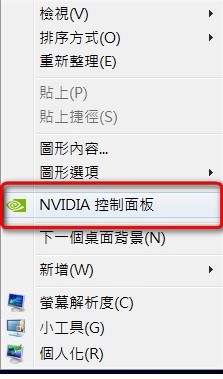
於桌面點滑鼠右鍵,選 [NVIDIA 控制面板]。
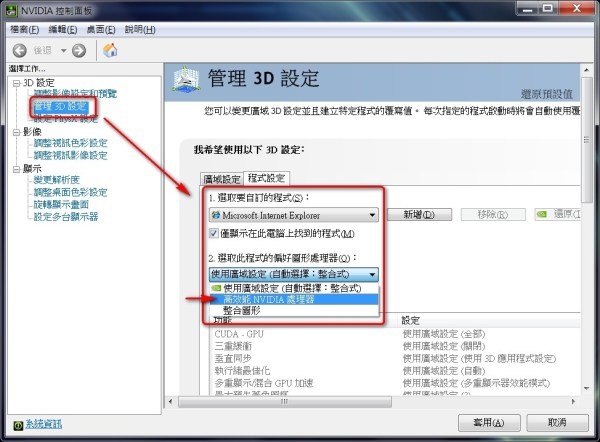
[選擇工作...] > [3D 設定] > [管理 3D 設定] > [程式設定],選取要自訂的程式 (如:Internet Explorer) 後,於 [選取此程式的偏好圖形處理器] 設定為 [高效能 NVIDIA 處理器]。