GA-X99-SOC Champion (Rev. 1.0)
LegacyIntel® X99 Chipset
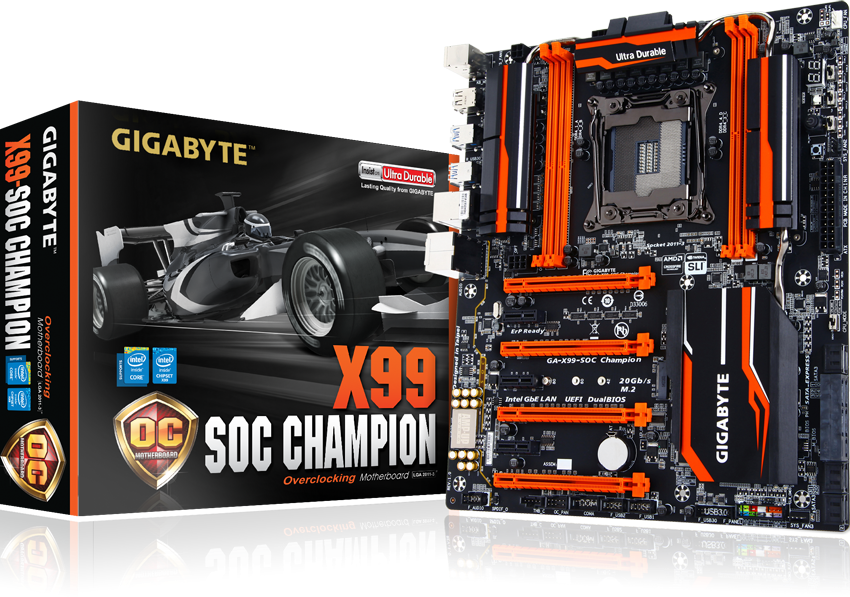

Spécifications
- Processeur
- Support for Intel® Core™ i7 processors in the LGA2011-3 package
- L3 cache varies with CPU
- Chipset
- Intel® X99 Express Chipset
- Mémoire
- 4 x DDR4 DIMM sockets supporting up to 64 GB of system memory
* Support for up to 256 GB of system memory when using Registered DIMMs.
* Due to a Windows 32-bit operating system limitation, when more than 4 GB of physical memory is installed, the actual memory size displayed will be less than the size of the physical memory installed. - 4 channel memory architecture
- Support for DDR4 3400(O.C.)* / 3333(O.C.) / 3200(O.C.) / 3000(O.C.) / 2800(O.C.) / 2666(O.C.) / 2400(O.C.) / 2133 MHz memory modules
- Support for non-ECC memory modules
- Support for Extreme Memory Profile (XMP) memory modules
- Support for RDIMM 1Rx8/2Rx8 memory modules (operates in non-ECC mode)
** Please refer "Memory Support List" for more information.- 4 x DDR4 DIMM sockets supporting up to 64 GB of system memory
- Audio
- Realtek® ALC1150 codec
- High Definition Audio
- 2/4/5.1/7.1-channel
- Support for S/PDIF Out
- Réseau
- Intel® GbE LAN chip (10/100/1000 Mbit)
- Port d'expansion
- 2 x PCI Express x16 slots, running at x16 (PCIE_1,PCIE_2)
* For optimum performance, if only one PCI Express graphics card is to be installed, be sure to install it in the PCIE_1 slot; if you are installing two PCI Express graphics cards, it is recommended that you install them in the PCIE_1 and PCIE_2 slots. - 2 x PCI Express x16 slots, running at x8 (PCIE_3,PCIE_4)
* The PCIE_4 slot shares bandwidth with the PCIE_1 slot. When the PCIE_4 slot is populated, the PCIE_1 slot will operate at up to x8 mode.
* When an 28 lane CPU is installed, the PCIE_2 slot operates at up to x8 mode and the PCIE_3 operates at up to x4 mode.
(All PCI Express x16 slots conform to PCI Express 3.0 standard.) - 3 x PCI Express x1 slots
(All PCI Express x1 slots conform to PCI Express 2.0 standard.)
- 2 x PCI Express x16 slots, running at x16 (PCIE_1,PCIE_2)
- Technologie Multi-cartes graphiques
- Support for NVIDIA® Quad-GPU SLI™ and 4-Way/3-Way/2-Way NVIDIA® SLI™ technologies
- Support for AMD Quad-GPU CrossFireX™ and 4-Way/3-Way/2-Way AMD CrossFire™ technologies
- Interface de Stockage
- Chipset:
- 1 x M.2 PCIe connector
(Socket 3, M key, type 2242/2260/2280 PCIe x4x2/x1 SSD support)
* Support for M.2 PCIe SSDs only. - 1 x SATA Express connector
- 6 x SATA 6Gb/s connectors (SATA3 0~5)
- Support for RAID 0, RAID 1, RAID 5, and RAID 10
* Only AHCI mode is supported when an M.2 PCIe SSD or a SATA Express device is installed.
(M2_20G and SATA Express connectors can only be used one at a time. The SATA Express connector becomes unavailable when an M.2 SSD is installed, but the SATA3 4/5 connectors are still functional.)
- 4 x SATA 6Gb/s connectors (sSATA3 0~3), supporting IDE and AHCI modes only
(An operating system installed on the SATA3 0~5 ports cannot be used on the sSATA 0~3 ports.)
- 1 x M.2 PCIe connector
- USB
- Chipset:
- 2 x USB 3.0/2.0 ports available through the internal USB header
- 8 x USB 2.0/1.1 ports (4 ports on the back panel, 4 ports available through the internal USB headers)
- 4 x USB 3.0/2.0 ports on the back panel
- Connecteurs d'entrées/sorties internes
- 1 x 24-pin ATX main power connector
- 1 x 8-pin ATX 12V power connector
- 1 x 4-pin ATX 12V power connector
- 1 x OC PEG Power Connector
- 1 x SATA Express connector
- 10 x SATA 6Gb/s connectors
- 1 x M.2 Socket 3 connector
- 1 x CPU fan header
- 1 x water cooling fan header (CPU_OPT)
- 3 x system fan headers
- 1 x Thunderbolt™ add-in card connector
- 1 x OC Panel connector (for future expansion)
- 1 x front panel header
- 1 x front panel audio header
- 1 x S/PDIF Out header
- 1 x USB 3.0/2.0 header
- 2 x USB 2.0/1.1 headers
- 1 x serial port header
- 1 x Clear CMOS jumper
- 1 x power button
- 1 x reset button
- 1 x Clear CMOS button
- 1 x CPU mode switch
- 1 x OC Trigger switch
- 1 x DualBIOS switch
- 1 x BIOS switch
- Voltage Measurement Points
- Connecteur du Panneau Arrière
- 1 x PS/2 keyboard port
- 1 x PS/2 mouse port
- 4 x USB 2.0/1.1 ports
- 4 x USB 3.0/2.0 ports
- 1 x RJ-45 port
- 1 x optical S/PDIF Out connector
- 5 x audio jacks (Center/Subwoofer Speaker Out, Rear Speaker Out, Line In, Line Out, Mic In)
- Contrôleur d'Entrée/Sortie
- iTE I/O Controller Chip
- Monitorage Matériel
- System voltage detection
- CPU/System/Chipset temperature detection
- CPU/CPU OPT/System fan speed detection
- CPU/System/Chipset overheating warning
- CPU/CPU OPT/System fan fail warning
- CPU/CPU OPT/System fan speed control
* Whether the fan speed control function is supported will depend on the cooler you install.
- BIOS
- 2 x 128 Mbit flash
- Use of licensed AMI UEFI BIOS
- Support for DualBIOS™
- PnP 1.0a, DMI 2.7, WfM 2.0, SM BIOS 2.7, ACPI 5.0
- Fonctionnalités Exclusives
- Support for APP Center
* Available applications in APP Center may differ by motherboard model. Supported functions of each application may also differ depending on motherboard specifications.
@BIOS
Ambient LED
EasyTune
EZ Setup
Fast Boot
Cloud Station
ON/OFF Charge
Smart TimeLock
Smart Recovery 2
System Information Viewer
USB Blocker
V-Tuner - Support for Q-Flash
- Support for Smart Switch
- Support for Xpress Install
- Support for APP Center
- Logiciels Fournis
- Norton® Internet Security (OEM version)
- Intel® Smart Response Technology
- cFosSpeed
- Système d'Exploitation
- Support for Windows 10/8.1/8/7
- Dimensions
- E-ATX Form Factor; 30.5cm x 26.4cm
- Remarque
- Due to different Linux support condition provided by chipset vendors, please download Linux driver from chipset vendors' website or 3rd party website.
- Most hardware/software vendors may no longer offer drivers to support Win9X/ME/2000/XP. If drivers are available from the vendors, we will update them on the GIGABYTE website.
- Processeur
- Support for Intel® Core™ i7 processors in the LGA2011-3 package
- L3 cache varies with CPU
- Chipset
- Intel® X99 Express Chipset
- Mémoire
- 4 x DDR4 DIMM sockets supporting up to 64 GB of system memory
* Support for up to 256 GB of system memory when using Registered DIMMs.
* Due to a Windows 32-bit operating system limitation, when more than 4 GB of physical memory is installed, the actual memory size displayed will be less than the size of the physical memory installed. - 4 channel memory architecture
- Support for DDR4 3400(O.C.)* / 3333(O.C.) / 3200(O.C.) / 3000(O.C.) / 2800(O.C.) / 2666(O.C.) / 2400(O.C.) / 2133 MHz memory modules
- Support for non-ECC memory modules
- Support for Extreme Memory Profile (XMP) memory modules
- Support for RDIMM 1Rx8/2Rx8 memory modules (operates in non-ECC mode)
** Please refer "Memory Support List" for more information.- 4 x DDR4 DIMM sockets supporting up to 64 GB of system memory
- Audio
- Realtek® ALC1150 codec
- High Definition Audio
- 2/4/5.1/7.1-channel
- Support for S/PDIF Out
- Réseau
- Intel® GbE LAN chip (10/100/1000 Mbit)
- Port d'expansion
- 2 x PCI Express x16 slots, running at x16 (PCIE_1,PCIE_2)
* For optimum performance, if only one PCI Express graphics card is to be installed, be sure to install it in the PCIE_1 slot; if you are installing two PCI Express graphics cards, it is recommended that you install them in the PCIE_1 and PCIE_2 slots. - 2 x PCI Express x16 slots, running at x8 (PCIE_3,PCIE_4)
* The PCIE_4 slot shares bandwidth with the PCIE_1 slot. When the PCIE_4 slot is populated, the PCIE_1 slot will operate at up to x8 mode.
* When an 28 lane CPU is installed, the PCIE_2 slot operates at up to x8 mode and the PCIE_3 operates at up to x4 mode.
(All PCI Express x16 slots conform to PCI Express 3.0 standard.) - 3 x PCI Express x1 slots
(All PCI Express x1 slots conform to PCI Express 2.0 standard.)
- 2 x PCI Express x16 slots, running at x16 (PCIE_1,PCIE_2)
- Technologie Multi-cartes graphiques
- Support for NVIDIA® Quad-GPU SLI™ and 4-Way/3-Way/2-Way NVIDIA® SLI™ technologies
- Support for AMD Quad-GPU CrossFireX™ and 4-Way/3-Way/2-Way AMD CrossFire™ technologies
- Interface de Stockage
- Chipset:
- 1 x M.2 PCIe connector
(Socket 3, M key, type 2242/2260/2280 PCIe x4x2/x1 SSD support)
* Support for M.2 PCIe SSDs only. - 1 x SATA Express connector
- 6 x SATA 6Gb/s connectors (SATA3 0~5)
- Support for RAID 0, RAID 1, RAID 5, and RAID 10
* Only AHCI mode is supported when an M.2 PCIe SSD or a SATA Express device is installed.
(M2_20G and SATA Express connectors can only be used one at a time. The SATA Express connector becomes unavailable when an M.2 SSD is installed, but the SATA3 4/5 connectors are still functional.)
- 4 x SATA 6Gb/s connectors (sSATA3 0~3), supporting IDE and AHCI modes only
(An operating system installed on the SATA3 0~5 ports cannot be used on the sSATA 0~3 ports.)
- 1 x M.2 PCIe connector
- USB
- Chipset:
- 2 x USB 3.0/2.0 ports available through the internal USB header
- 8 x USB 2.0/1.1 ports (4 ports on the back panel, 4 ports available through the internal USB headers)
- 4 x USB 3.0/2.0 ports on the back panel
- Connecteurs d'entrées/sorties internes
- 1 x 24-pin ATX main power connector
- 1 x 8-pin ATX 12V power connector
- 1 x 4-pin ATX 12V power connector
- 1 x OC PEG Power Connector
- 1 x SATA Express connector
- 10 x SATA 6Gb/s connectors
- 1 x M.2 Socket 3 connector
- 1 x CPU fan header
- 1 x water cooling fan header (CPU_OPT)
- 3 x system fan headers
- 1 x Thunderbolt™ add-in card connector
- 1 x OC Panel connector (for future expansion)
- 1 x front panel header
- 1 x front panel audio header
- 1 x S/PDIF Out header
- 1 x USB 3.0/2.0 header
- 2 x USB 2.0/1.1 headers
- 1 x serial port header
- 1 x Clear CMOS jumper
- 1 x power button
- 1 x reset button
- 1 x Clear CMOS button
- 1 x CPU mode switch
- 1 x OC Trigger switch
- 1 x DualBIOS switch
- 1 x BIOS switch
- Voltage Measurement Points
- Connecteur du Panneau Arrière
- 1 x PS/2 keyboard port
- 1 x PS/2 mouse port
- 4 x USB 2.0/1.1 ports
- 4 x USB 3.0/2.0 ports
- 1 x RJ-45 port
- 1 x optical S/PDIF Out connector
- 5 x audio jacks (Center/Subwoofer Speaker Out, Rear Speaker Out, Line In, Line Out, Mic In)
- Contrôleur d'Entrée/Sortie
- iTE I/O Controller Chip
- Monitorage Matériel
- System voltage detection
- CPU/System/Chipset temperature detection
- CPU/CPU OPT/System fan speed detection
- CPU/System/Chipset overheating warning
- CPU/CPU OPT/System fan fail warning
- CPU/CPU OPT/System fan speed control
* Whether the fan speed control function is supported will depend on the cooler you install.
- BIOS
- 2 x 128 Mbit flash
- Use of licensed AMI UEFI BIOS
- Support for DualBIOS™
- PnP 1.0a, DMI 2.7, WfM 2.0, SM BIOS 2.7, ACPI 5.0
- Fonctionnalités Exclusives
- Support for APP Center
* Available applications in APP Center may differ by motherboard model. Supported functions of each application may also differ depending on motherboard specifications.
@BIOS
Ambient LED
EasyTune
EZ Setup
Fast Boot
Cloud Station
ON/OFF Charge
Smart TimeLock
Smart Recovery 2
System Information Viewer
USB Blocker
V-Tuner - Support for Q-Flash
- Support for Smart Switch
- Support for Xpress Install
- Support for APP Center
- Logiciels Fournis
- Norton® Internet Security (OEM version)
- Intel® Smart Response Technology
- cFosSpeed
- Système d'Exploitation
- Support for Windows 10/8.1/8/7
- Dimensions
- E-ATX Form Factor; 30.5cm x 26.4cm
- Remarque
- Due to different Linux support condition provided by chipset vendors, please download Linux driver from chipset vendors' website or 3rd party website.
- Most hardware/software vendors may no longer offer drivers to support Win9X/ME/2000/XP. If drivers are available from the vendors, we will update them on the GIGABYTE website.

* Les termes HDMI, interface multimédia haute définition HDMI et habillage commercial HDMI, et les logos HDMI sont des marques commerciales et des marques déposées de HDMI Licensing Administrator, Inc.
* Les informations ici proposées le sont pour référence uniquement. GIGABYTE se réserve le droit de modifier ce contenu à tout moment et sans préavis.
*Les performances affichées sont basées sur les informations proposées par les constructeurs de chipsets ou sociétés définissant les caractéristiques des interfaces. Performances pouvant varier selon configuration.
* Marques et logos appartiennent aux détenteurs respectifs de leurs droits.
* L'architecture de grand nombre de PC affectera directement la capacité mémoire, en effet, une certaine quantité de RAM sera affectée au système, la quantité totale affichée pourra alors varier de celle insérée sur votre carte mère
*Les performances affichées sont basées sur les informations proposées par les constructeurs de chipsets ou sociétés définissant les caractéristiques des interfaces. Performances pouvant varier selon configuration.
* Marques et logos appartiennent aux détenteurs respectifs de leurs droits.
* L'architecture de grand nombre de PC affectera directement la capacité mémoire, en effet, une certaine quantité de RAM sera affectée au système, la quantité totale affichée pourra alors varier de celle insérée sur votre carte mère