GA-X58A-UD9 (Rev. 1.0)
レガシー機器Intel® X58 + ICH10R Chipset
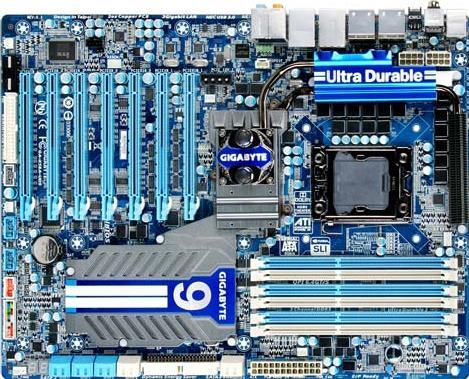


仕様
- 対応 CPU
- Support for an Intel® Core™ i7 series processor in the LGA1366 package (Go to GIGABYTE's website for the latest CPU support list.)
- L3 cache varies with CPU
- QPI
- 4.8GT/s, 6.4GT/s
- チップセット
- North Bridge: Intel® X58 Express Chipset
- South Bridge: Intel® ICH10R
- メモリー
- 6 x 1.5V DDR3 DIMM sockets supporting up to 24 GB of system memory(Note 1)
- Dual/3 channel memory architecture
- Support for DDR3 2200+/1333/1066/800 MHz memory modules
- Support for non-ECC memory modules
- Support for Extreme Memory Profile (XMP) memory modules
- オーディオ
- Realtek ALC889 codec
- High Definition Audio
- 2/4/5.1/7.1-channel
- Support for Dolby® Home Theater
- Support for S/PDIF In/Out
- Support for CD In
- 有線 LAN
- 2 x Realtek RTL8111E chip (10/100/1000 Mbit)
- Support for Teaming
- Support Smart Dual LAN
- 拡張スロット
- 4 x PCI Express x16 slots, running at x16 (PCIEX16_1/PCIEX16_2/PCIEX16_3/PCIEX16_4) (Note 2)
- 3 x PCI Express x16 slots, running at x8 (PCIEX8_1/PCIEX8_2/PCIEX8_3) (Note 3) (All PCI Express slots conform to the PCI Express 2.0)
- マルチ・グラフィックス
- Support for 2-Way/3-Way/4-Way ATI CrossFireX™/NVIDIA SLI technology
- ストレージ端子
- South Bridge:
- 6 x SATA 3Gb/s connectors (SATA2_0, SATA2_1, SATA2_2, SATA2_3, SATA2_4, SATA2_5) supporting up to 6 SATA 3Gb/s devices
- Support for SATA RAID 0, RAID 1, RAID 5, and RAID 10
- 2 x SATA 6Gb/s connectors (GSATA3_6, GSATA3_7) supporting up to 2 SATA 6Gb/s devices
- Support for SATA RAID 0, and RAID 1
* SATA3 SSDs are not recommended for use in RAID 0 mode on Marvell SE9128 ports.
GIGABYTE SATA2 chip:- 1 x IDE connector supporting ATA-133/100/66/33 and up to 2 IDE devices
- 2 x SATA 3Gb/s connectors (GSATA2_8, GSATA2_9) supporting up to 2 SATA 3Gb/s devices
- Support for SATA RAID 0, RAID 1, and JBOD
- 2 x eSATA 3Gb/s connectors (eSATA/USB Combo) on the back panel sup- porting up to 2 SATA 3Gb/s devices
- Support for SATA RAID 0, RAID 1, and JBOD
- 1 x floppy disk drive connector supporting up to 1 floppy disk drive
- USB 端子
- Integrated in the South Bridge:
- Up to 12 USB 2.0/1.1 ports (6 on the back panel, including 2 eSATA/USB Combo, 4 via the USB brackets connected to the internal USB headers)
- Up to 2 USB 3.0/2.0 ports on the back panel
- IEEE 1394
- T.I. TSB43AB23 chip
- Up to 3 IEEE 1394a ports (2 on the back panel, 1 via the IEEE 1394a bracket connected to the internal IEEE 1394a header)
- 内部入出力端子
- 1 x 24-pin ATX main power connector
- 2 x 8-pin ATX 12V power connector
- 2 x 4-pin PCIe 12V power connectors
- 1 x floppy disk drive connector
- 1 x IDE connector
- 8 x SATA 3Gb/s connectors
- 2 x SATA 6Gb/s connectors
- 1 x CPU fan header
- 3 x system fan headers
- 1 x power fan header
- 1 x North Bridge fan header
- 1 x front panel header
- 1 x front panel audio header
- 1 x CD In connector
- 1 x S/PDIF In header
- 1 x S/PDIF Out header
- 3 x USB 2.0/1.1 headers
- 1 x IEEE 1394a header
- 1 x power button
- 1 x reset button
- バックパネル端子
- 1 x PS/2 keyboard port
- 1 x PS/2 mouse port
- 1 x coaxial S/PDIF Out connector
- 1 x optical S/PDIF Out connector
- 1 x clearing CMOS button
- 2 x IEEE 1394a ports
- 4 x USB 2.0/1.1 ports
- 2 x USB 3.0 ports
- 2 x eSATA/USB Combo connectors
- 2 x RJ-45 port
- 6 x audio jacks (Center/Subwoofer Speaker Out/Rear Speaker Out/ Side Speaker Out/Line In/Line Out/Microphone)
- I/O コントローラー
- iTE IT8720 chip
- ハードウェア・モニター
- System voltage detection
- CPU/North Bridge temperature detection
- CPU/System/Power fan speed detection
- CPU overheating warning
- CPU fan fail warning
- CPU/System fan speed control (Note 4)
- BIOS
- 2 x 16 Mbit flash
- Use of licensed AWARD BIOS
- Support for DualBIOS™
- PnP 1.0a, DMI 2.0, SM BIOS 2.4, ACPI 1.0b
- 独自機能
- Support for @BIOS
- Support for Q-Flash
- Support for Xpress BIOS Rescue
- Support for Download Center
- Support for Xpress Install
- Support for Xpress Recovery2
- Support for EasyTune (Note 5)
- Support for Dynamic Energy Saver™ 2
- Support for Smart 6™
- Support for Auto Green
- Support for eXtreme Hard Drive (X.H.D)
- Support for ON/OFF Charge
- Support for Q-Share
- バンドル・ソフトウェア
- Norton Internet Security (OEM version)
- 対応 OS
- Support for Microsoft® Windows® 7/Vista/XP
- フォームファクター
- XL-ATX Form Factor; 34.5cm x 26.2cm
- 注記
- (Note 1) Due to Windows 32-bit operating system limitation, when more than 4 GB of physical memory is installed, the actual memory size displayed will be less than 4 GB.
(Note 2) For optimum performance, if only one PCI Express graphics card is to be installed, be sure to install it in the PCIEX16_1 slot; if you are installing two PCI Express graphics cards, it is recommended that you install them in the PCIEX16_1 and PCIEX16_3 slots. (Note 3) Each PCIEX8 slot shares bandwidth with the corresponding PCIEX16 slot (PCIEX8_1 with PCIEX16_1, PCIEX8_2 with PCIEX16_2, and PCIEX8_3 with PCIEX16_3). When a PCIEX8 slot is populated, its corresponding PCIEX16 slot will operate at up to x8 mode.
(Note 4) Whether the CPU fan speed control function is supported will depend on the CPU cooler you install.
(Note 5) Available functions in EasyTune may differ by motherboard model.
- 注意
- Due to different Linux support condition provided by chipset vendors, please download Linux driver from chipset vendors' website or 3rd party website.
- Most hardware/software vendors may no longer offer drivers to support Win9X/ME/2000/XP SP1/SP2. If drivers are available from the vendors, we will update them on the GIGABYTE website.
- A case with 9 or more expansion slots is required, 10 for 4-Way VGA card. Please refer to "Chassis Support List" for compatible PC cases.
- 対応 CPU
- Support for an Intel® Core™ i7 series processor in the LGA1366 package (Go to GIGABYTE's website for the latest CPU support list.)
- L3 cache varies with CPU
- QPI
- 4.8GT/s, 6.4GT/s
- チップセット
- North Bridge: Intel® X58 Express Chipset
- South Bridge: Intel® ICH10R
- メモリー
- 6 x 1.5V DDR3 DIMM sockets supporting up to 24 GB of system memory(Note 1)
- Dual/3 channel memory architecture
- Support for DDR3 2200+/1333/1066/800 MHz memory modules
- Support for non-ECC memory modules
- Support for Extreme Memory Profile (XMP) memory modules
- オーディオ
- Realtek ALC889 codec
- High Definition Audio
- 2/4/5.1/7.1-channel
- Support for Dolby® Home Theater
- Support for S/PDIF In/Out
- Support for CD In
- 有線 LAN
- 2 x Realtek RTL8111E chip (10/100/1000 Mbit)
- Support for Teaming
- Support Smart Dual LAN
- 拡張スロット
- 4 x PCI Express x16 slots, running at x16 (PCIEX16_1/PCIEX16_2/PCIEX16_3/PCIEX16_4) (Note 2)
- 3 x PCI Express x16 slots, running at x8 (PCIEX8_1/PCIEX8_2/PCIEX8_3) (Note 3) (All PCI Express slots conform to the PCI Express 2.0)
- マルチ・グラフィックス
- Support for 2-Way/3-Way/4-Way ATI CrossFireX™/NVIDIA SLI technology
- ストレージ端子
- South Bridge:
- 6 x SATA 3Gb/s connectors (SATA2_0, SATA2_1, SATA2_2, SATA2_3, SATA2_4, SATA2_5) supporting up to 6 SATA 3Gb/s devices
- Support for SATA RAID 0, RAID 1, RAID 5, and RAID 10
- 2 x SATA 6Gb/s connectors (GSATA3_6, GSATA3_7) supporting up to 2 SATA 6Gb/s devices
- Support for SATA RAID 0, and RAID 1
* SATA3 SSDs are not recommended for use in RAID 0 mode on Marvell SE9128 ports.
GIGABYTE SATA2 chip:- 1 x IDE connector supporting ATA-133/100/66/33 and up to 2 IDE devices
- 2 x SATA 3Gb/s connectors (GSATA2_8, GSATA2_9) supporting up to 2 SATA 3Gb/s devices
- Support for SATA RAID 0, RAID 1, and JBOD
- 2 x eSATA 3Gb/s connectors (eSATA/USB Combo) on the back panel sup- porting up to 2 SATA 3Gb/s devices
- Support for SATA RAID 0, RAID 1, and JBOD
- 1 x floppy disk drive connector supporting up to 1 floppy disk drive
- USB 端子
- Integrated in the South Bridge:
- Up to 12 USB 2.0/1.1 ports (6 on the back panel, including 2 eSATA/USB Combo, 4 via the USB brackets connected to the internal USB headers)
- Up to 2 USB 3.0/2.0 ports on the back panel
- IEEE 1394
- T.I. TSB43AB23 chip
- Up to 3 IEEE 1394a ports (2 on the back panel, 1 via the IEEE 1394a bracket connected to the internal IEEE 1394a header)
- 内部入出力端子
- 1 x 24-pin ATX main power connector
- 2 x 8-pin ATX 12V power connector
- 2 x 4-pin PCIe 12V power connectors
- 1 x floppy disk drive connector
- 1 x IDE connector
- 8 x SATA 3Gb/s connectors
- 2 x SATA 6Gb/s connectors
- 1 x CPU fan header
- 3 x system fan headers
- 1 x power fan header
- 1 x North Bridge fan header
- 1 x front panel header
- 1 x front panel audio header
- 1 x CD In connector
- 1 x S/PDIF In header
- 1 x S/PDIF Out header
- 3 x USB 2.0/1.1 headers
- 1 x IEEE 1394a header
- 1 x power button
- 1 x reset button
- バックパネル端子
- 1 x PS/2 keyboard port
- 1 x PS/2 mouse port
- 1 x coaxial S/PDIF Out connector
- 1 x optical S/PDIF Out connector
- 1 x clearing CMOS button
- 2 x IEEE 1394a ports
- 4 x USB 2.0/1.1 ports
- 2 x USB 3.0 ports
- 2 x eSATA/USB Combo connectors
- 2 x RJ-45 port
- 6 x audio jacks (Center/Subwoofer Speaker Out/Rear Speaker Out/ Side Speaker Out/Line In/Line Out/Microphone)
- I/O コントローラー
- iTE IT8720 chip
- ハードウェア・モニター
- System voltage detection
- CPU/North Bridge temperature detection
- CPU/System/Power fan speed detection
- CPU overheating warning
- CPU fan fail warning
- CPU/System fan speed control (Note 4)
- BIOS
- 2 x 16 Mbit flash
- Use of licensed AWARD BIOS
- Support for DualBIOS™
- PnP 1.0a, DMI 2.0, SM BIOS 2.4, ACPI 1.0b
- 独自機能
- Support for @BIOS
- Support for Q-Flash
- Support for Xpress BIOS Rescue
- Support for Download Center
- Support for Xpress Install
- Support for Xpress Recovery2
- Support for EasyTune (Note 5)
- Support for Dynamic Energy Saver™ 2
- Support for Smart 6™
- Support for Auto Green
- Support for eXtreme Hard Drive (X.H.D)
- Support for ON/OFF Charge
- Support for Q-Share
- バンドル・ソフトウェア
- Norton Internet Security (OEM version)
- 対応 OS
- Support for Microsoft® Windows® 7/Vista/XP
- フォームファクター
- XL-ATX Form Factor; 34.5cm x 26.2cm
- 注記
- (Note 1) Due to Windows 32-bit operating system limitation, when more than 4 GB of physical memory is installed, the actual memory size displayed will be less than 4 GB.
(Note 2) For optimum performance, if only one PCI Express graphics card is to be installed, be sure to install it in the PCIEX16_1 slot; if you are installing two PCI Express graphics cards, it is recommended that you install them in the PCIEX16_1 and PCIEX16_3 slots. (Note 3) Each PCIEX8 slot shares bandwidth with the corresponding PCIEX16 slot (PCIEX8_1 with PCIEX16_1, PCIEX8_2 with PCIEX16_2, and PCIEX8_3 with PCIEX16_3). When a PCIEX8 slot is populated, its corresponding PCIEX16 slot will operate at up to x8 mode.
(Note 4) Whether the CPU fan speed control function is supported will depend on the CPU cooler you install.
(Note 5) Available functions in EasyTune may differ by motherboard model.
- 注意
- Due to different Linux support condition provided by chipset vendors, please download Linux driver from chipset vendors' website or 3rd party website.
- Most hardware/software vendors may no longer offer drivers to support Win9X/ME/2000/XP SP1/SP2. If drivers are available from the vendors, we will update them on the GIGABYTE website.
- A case with 9 or more expansion slots is required, 10 for 4-Way VGA card. Please refer to "Chassis Support List" for compatible PC cases.

* HDMI、HDMI High-Definition Multimedia Interfaceという語、HDMIのトレードドレスおよびHDMIのロゴは、HDMI Licensing Administrator, Inc.の商標または登録商標です。
* ここに記載されている全ての資料は参考用です。 GIGABYTEは、予告なしに変更する場合があります。
* パフォーマンスについては、インターフェイス仕様の理論上の最大値に基づいています。 実際のパフォーマンスは、システム構成によって異なる場合があります。
* 記載されている会社名、商品名、およびロゴは各社の商標または登録商標です。
* メモリー容量は、システムリソースに予約され実際の搭載メモリーより少なくなる場合があります。
* パフォーマンスについては、インターフェイス仕様の理論上の最大値に基づいています。 実際のパフォーマンスは、システム構成によって異なる場合があります。
* 記載されている会社名、商品名、およびロゴは各社の商標または登録商標です。
* メモリー容量は、システムリソースに予約され実際の搭載メモリーより少なくなる場合があります。