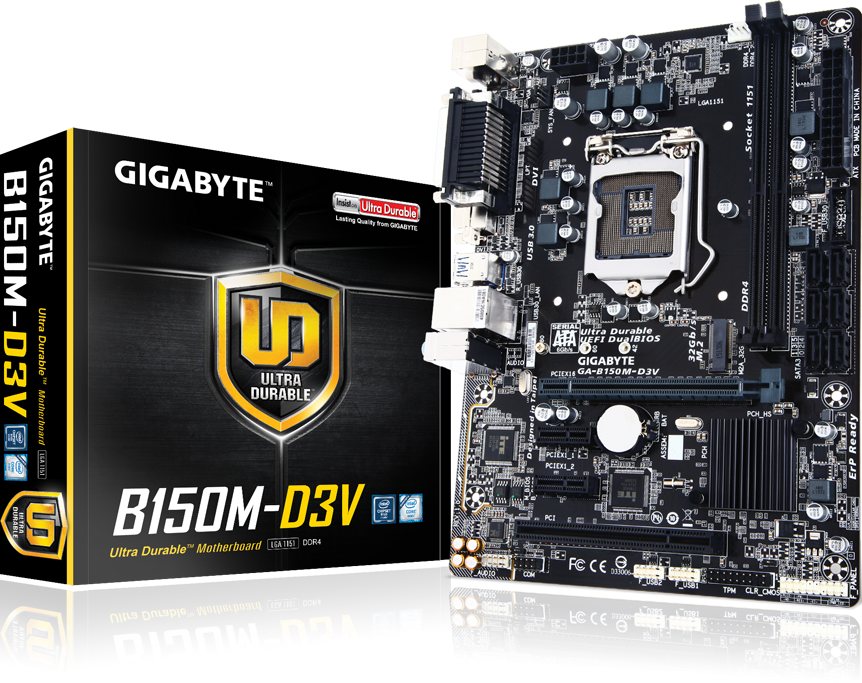
GA-B150M-D3V (Rev. 1.0)
LegacyIntel® B150 Chipset

제품 사양
- CPU
- Support for 7th/6th Generation Intel® Core™ i7 processors/Intel® Core™ i5 processors/
Intel® Core™ i3 processors/Intel® Pentium® processors/
Intel® Celeron® processors in the LGA1151 package
* For 7th Generation Intel® Core™ processors support need to update the latest BIOS. - L3 cache varies with CPU
- Support for 7th/6th Generation Intel® Core™ i7 processors/Intel® Core™ i5 processors/
Intel® Core™ i3 processors/Intel® Pentium® processors/
Intel® Celeron® processors in the LGA1151 package
- 칩셋
- Intel® B150 Express Chipset
- 메모리
- 2 x DDR4 DIMM sockets supporting up to 32 GB of system memory
* Due to a Windows 32-bit operating system limitation, when more than 4 GB of physical memory is installed, the actual memory size displayed will be less than the size of the physical memory installed. - Dual channel memory architecture
- Support for DDR4 2133 MHz memory modules
- Support for ECC UDIMM 1Rx8/2Rx8 memory modules (operate in non-ECC mode)
- Support for non-ECC UDIMM 1Rx8/2Rx8/1Rx16 memory modules
- 2 x DDR4 DIMM sockets supporting up to 32 GB of system memory
- 온보드 그래픽
- Integrated Graphics Processor- Intel® HD Graphics support:
- 1 x D-Sub port, supporting a maximum resolution of 1920x1200@60 Hz
- 1 x DVI-D port, supporting a maximum resolution of 1920x1200@60 Hz
* The DVI-D port does not support D-Sub connection by adapter.
- 오디오
- Realtek® ALC887 codec
- High Definition Audio
- 2/4/5.1/7.1-channel
* To configure 7.1-channel audio, you have to use an HD front panel audio module and enable the multi-channel audio feature through the audio driver. - Support for S/PDIF Out
- 랜
- Realtek® GbE LAN chip (10/100/1000 Mbit)
- 확장 슬롯
- 1 x PCI Express x16 slot, running at x16 (PCIEX16)
* For optimum performance, if only one PCI Express graphics card is to be installed, be sure to install it in the PCIEX16 slot. - 2 x PCI Express x1 slots
(All of the PCI Express slots conform to PCI Express 3.0 standard.) - 1 x PCI slot
- 1 x PCI Express x16 slot, running at x16 (PCIEX16)
- 스토리지 인터페이스
- Chipset:
- 1 x M.2 Socket 3 connector (Socket 3, M key, type 2242/2260/2280 SATA & PCIe x4/x2/x1 SSD support)
- 6 x SATA 6Gb/s connectors
- USB
- Chipset:
- 6 x USB 3.0/2.0 ports (4 ports on the back panel, 2 ports available through the internal USB header)
- 6 x USB 2.0/1.1 ports (2 ports on the back panel, 4 ports available through the internal USB headers)
- 내부 I / O 커넥터
- 1 x 24-pin ATX main power connector
- 1 x 8-pin ATX 12V power connector
- 1 x M.2 Socket 3 connector
- 6 x SATA 6Gb/s connectors
- 1 x CPU fan header
- 1 x system fan header
- 1 x front panel header
- 1 x front panel audio header
- 1 x S/PDIF Out header
- 1 x USB 3.0/2.0 header
- 2 x USB 2.0/1.1 headers
- 1 x Trusted Platform Module (TPM) header
- 1 x serial port header
- 1 x Clear CMOS jumper
- 후면 패널 커넥터
- 1 x PS/2 keyboard/mouse port
- 1 x D-Sub port
- 1 x DVI-D port
- 1 x Parallel port
- 4 x USB 3.0/2.0 ports
- 2 x USB 2.0/1.1 ports
- 1 x RJ-45 port
- 3 x audio jacks (Line In, Line Out, Mic In)
- I / O 컨트롤러
- iTE® I/O Controller Chip
- H / W 모니터링
- System voltage detection
- CPU/System temperature detection
- CPU/System fan speed detection
- CPU/System overheating warning
- CPU/System fan fail warning
- CPU/System fan speed control
* Whether the fan speed control function is supported will depend on the cooler you install.
- BIOS
- 2 x 64 Mbit flash
- Use of licensed AMI UEFI BIOS
- Support for DualBIOS™
- PnP 1.0a, DMI 2.7, WfM 2.0, SM BIOS 2.7, ACPI 5.0
- 특징
- Support for APP Center
* Available applications in APP Center may vary by motherboard model. Supported functions of each application may also vary depending on motherboard specifications.
3D OSD
@BIOS
AutoGreen
Cloud Station
EasyTune
Fast Boot
Smart TimeLock
Smart Keyboard
Smart Backup
System Information Viewer
USB Blocker - Support for Q-Flash
- Support for Smart Switch
- Support for Xpress Install
- Support for APP Center
- 번들 소프트웨어
- Norton® Internet Security (OEM version)
- cFosSpeed
- 운영 체제
- Windows® 10 64-bit (for 7th Generation Intel® Processors)
- Windows® 10 64-bit / Windows® 8.1 64-bit / Windows® 7 32-bit / 64-bits (for 6th Generation Intel® Processors)
* Please download the "Windows USB Installation Tool" from GIGABYTE's website and install it before installing Windows 7.
- Windows® 10 64-bit (for 7th Generation Intel® Processors)
- Form Factor
- Micro ATX Form Factor; 24.4cm x 17.4cm
- Remark
- Due to different Linux support condition provided by chipset vendors, please download Linux driver from chipset vendors' website or 3rd party website.
- Most hardware/software vendors may no longer offer drivers to support Win9X/ME/2000/XP. If drivers are available from the vendors, we will update them on the GIGABYTE website.
- CPU
- Support for 7th/6th Generation Intel® Core™ i7 processors/Intel® Core™ i5 processors/
Intel® Core™ i3 processors/Intel® Pentium® processors/
Intel® Celeron® processors in the LGA1151 package
* For 7th Generation Intel® Core™ processors support need to update the latest BIOS. - L3 cache varies with CPU
- Support for 7th/6th Generation Intel® Core™ i7 processors/Intel® Core™ i5 processors/
Intel® Core™ i3 processors/Intel® Pentium® processors/
Intel® Celeron® processors in the LGA1151 package
- 칩셋
- Intel® B150 Express Chipset
- 메모리
- 2 x DDR4 DIMM sockets supporting up to 32 GB of system memory
* Due to a Windows 32-bit operating system limitation, when more than 4 GB of physical memory is installed, the actual memory size displayed will be less than the size of the physical memory installed. - Dual channel memory architecture
- Support for DDR4 2133 MHz memory modules
- Support for ECC UDIMM 1Rx8/2Rx8 memory modules (operate in non-ECC mode)
- Support for non-ECC UDIMM 1Rx8/2Rx8/1Rx16 memory modules
- 2 x DDR4 DIMM sockets supporting up to 32 GB of system memory
- 온보드 그래픽
- Integrated Graphics Processor- Intel® HD Graphics support:
- 1 x D-Sub port, supporting a maximum resolution of 1920x1200@60 Hz
- 1 x DVI-D port, supporting a maximum resolution of 1920x1200@60 Hz
* The DVI-D port does not support D-Sub connection by adapter.
- 오디오
- Realtek® ALC887 codec
- High Definition Audio
- 2/4/5.1/7.1-channel
* To configure 7.1-channel audio, you have to use an HD front panel audio module and enable the multi-channel audio feature through the audio driver. - Support for S/PDIF Out
- 랜
- Realtek® GbE LAN chip (10/100/1000 Mbit)
- 확장 슬롯
- 1 x PCI Express x16 slot, running at x16 (PCIEX16)
* For optimum performance, if only one PCI Express graphics card is to be installed, be sure to install it in the PCIEX16 slot. - 2 x PCI Express x1 slots
(All of the PCI Express slots conform to PCI Express 3.0 standard.) - 1 x PCI slot
- 1 x PCI Express x16 slot, running at x16 (PCIEX16)
- 스토리지 인터페이스
- Chipset:
- 1 x M.2 Socket 3 connector (Socket 3, M key, type 2242/2260/2280 SATA & PCIe x4/x2/x1 SSD support)
- 6 x SATA 6Gb/s connectors
- USB
- Chipset:
- 6 x USB 3.0/2.0 ports (4 ports on the back panel, 2 ports available through the internal USB header)
- 6 x USB 2.0/1.1 ports (2 ports on the back panel, 4 ports available through the internal USB headers)
- 내부 I / O 커넥터
- 1 x 24-pin ATX main power connector
- 1 x 8-pin ATX 12V power connector
- 1 x M.2 Socket 3 connector
- 6 x SATA 6Gb/s connectors
- 1 x CPU fan header
- 1 x system fan header
- 1 x front panel header
- 1 x front panel audio header
- 1 x S/PDIF Out header
- 1 x USB 3.0/2.0 header
- 2 x USB 2.0/1.1 headers
- 1 x Trusted Platform Module (TPM) header
- 1 x serial port header
- 1 x Clear CMOS jumper
- 후면 패널 커넥터
- 1 x PS/2 keyboard/mouse port
- 1 x D-Sub port
- 1 x DVI-D port
- 1 x Parallel port
- 4 x USB 3.0/2.0 ports
- 2 x USB 2.0/1.1 ports
- 1 x RJ-45 port
- 3 x audio jacks (Line In, Line Out, Mic In)
- I / O 컨트롤러
- iTE® I/O Controller Chip
- H / W 모니터링
- System voltage detection
- CPU/System temperature detection
- CPU/System fan speed detection
- CPU/System overheating warning
- CPU/System fan fail warning
- CPU/System fan speed control
* Whether the fan speed control function is supported will depend on the cooler you install.
- BIOS
- 2 x 64 Mbit flash
- Use of licensed AMI UEFI BIOS
- Support for DualBIOS™
- PnP 1.0a, DMI 2.7, WfM 2.0, SM BIOS 2.7, ACPI 5.0
- 특징
- Support for APP Center
* Available applications in APP Center may vary by motherboard model. Supported functions of each application may also vary depending on motherboard specifications.
3D OSD
@BIOS
AutoGreen
Cloud Station
EasyTune
Fast Boot
Smart TimeLock
Smart Keyboard
Smart Backup
System Information Viewer
USB Blocker - Support for Q-Flash
- Support for Smart Switch
- Support for Xpress Install
- Support for APP Center
- 번들 소프트웨어
- Norton® Internet Security (OEM version)
- cFosSpeed
- 운영 체제
- Windows® 10 64-bit (for 7th Generation Intel® Processors)
- Windows® 10 64-bit / Windows® 8.1 64-bit / Windows® 7 32-bit / 64-bits (for 6th Generation Intel® Processors)
* Please download the "Windows USB Installation Tool" from GIGABYTE's website and install it before installing Windows 7.
- Windows® 10 64-bit (for 7th Generation Intel® Processors)
- Form Factor
- Micro ATX Form Factor; 24.4cm x 17.4cm
- Remark
- Due to different Linux support condition provided by chipset vendors, please download Linux driver from chipset vendors' website or 3rd party website.
- Most hardware/software vendors may no longer offer drivers to support Win9X/ME/2000/XP. If drivers are available from the vendors, we will update them on the GIGABYTE website.

* HDMI, HDMI High-Definition Multimedia Interface(고화질멀티미디어인터페이스), HDMI 트레이드드레스및 HDMI 로고라는용어는 HDMI Licensing Administrator, Inc.의상표또는등록상표입니다.
* 사이트에서 제공되는 모든 자료는 참조용일 뿐입니다. 기가바이트는 사이트의 자료를 사전 통지없이 언제든지 수정할 권리를 지닙니다.
* 모든 상표와 로고는 해당 소유자의 자산입니다.
* PC의 표준 아키텍쳐에 의해, 메모리의 특정 부분이 시스템에 사용되어 실제 메모리 크기는 표준보다 적게 표시될 수 있습니다.
* 모든 상표와 로고는 해당 소유자의 자산입니다.
* PC의 표준 아키텍쳐에 의해, 메모리의 특정 부분이 시스템에 사용되어 실제 메모리 크기는 표준보다 적게 표시될 수 있습니다.