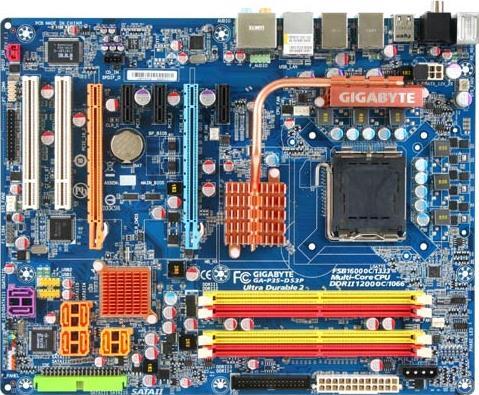
제품 사양
- CPU
- Support for an Intel® Core™ 2 Extreme processor/
Intel® Core™ 2 Quad processor/Intel® Core™ 2 Duo processor/
Intel® Pentium® processor Extreme Edition/Intel® Pentium® D processor/
Intel® Pentium® 4 processor Extreme Edition/Intel® Pentium® 4 processor/
Intel® Celeron® processor in the LGA 775 package
(Go to GIGABYTE's website for the latest CPU support list.) - L2 cache varies with CPU
- 1600 (O.C.)/1333/1066/800 MHz FSB
- Support for an Intel® Core™ 2 Extreme processor/
Intel® Core™ 2 Quad processor/Intel® Core™ 2 Duo processor/
Intel® Pentium® processor Extreme Edition/Intel® Pentium® D processor/
Intel® Pentium® 4 processor Extreme Edition/Intel® Pentium® 4 processor/
Intel® Celeron® processor in the LGA 775 package
- 칩셋
- North Bridge: Intel® P35 Chipset
- South Bridge: Intel® ICH9R
- 메모리
- 4 x 1.8V DDR2 DIMM sockets supporting up to 8 GB of system memory
- Dual channel memory architecture
- Support for DDR2 1200 (O.C.)/1066/800/667 MHz memory modules
- 오디오
- Realtek ALC889A codec
- High Definition Audio
- 2/4/5.1/7.1-channel
- Support for S/PDIF In/Out
- Support for CD In
- 랜
- Realtek 8111B chip (10/100/1000 Mbit)
- 확장 슬롯
- 2 x PCI Express x16 slots (The PCIE_16_1 slot supports x16; the PCIE_16_2 supports x4.)
- 3 x PCI Express x1 slots (share with the PCIE_16_2 slot)
- 2 x PCI slots
- 스토리지 인터페이스
- South Bridge:
- 6 x SATA 3Gb/s connectors (SATAII0, SATAII1, SATAII2, SATAII3, SATAII4, SATAII5) supporting up to 6 SATA 3Gb/s devices
- Support for SATA RAID 0, RAID 1, RAID 5, and RAID 10
- 1 x IDE connector supporting ATA-133/100/66/33 and up to 2 IDE devices
- 2 x SATA 3Gb/s connectors (GSATAII0, GSATAII1) supporting up to 2 SATA 3Gb/s devices
- Support for SATA RAID 0, RAID 1, and JBOD
- 1 x floppy disk drive connector supporting up to 1 floppy disk drive
- USB
- Integrated in the South Bridge
- Up to 12 USB 2.0/1.1 ports (8 on the back panel, 4 via the USB brackets connected to the internal USB headers)
- IEEE 1394
- T.I. TSB43AB23 chip
- Up to 3 IEEE 1394a ports (2 on the back panel, 1 via the IEEE 1394 bracket connected to the internal IEEE 1394 header)
- 내부 I / O 커넥터
- 1 x 24-pin ATX main power connector
- 1 x 8-pin ATX 12V power connector
- 1 x 4-pin PCIe 12V power connector
- 1 x floppy disk drive connector
- 1 x IDE connector
- 8 x SATA 3Gb/s connectors
- 1 x CPU fan header
- 2 x system fan headers
- 1 x power fan header
- 1 x North Bridge fan header
- 1 x front panel header
- 1 x front panel audio header
- 1 x CD In connector
- 1 x S/PDIF In header
- 1 x S/PDIF Out header
- 2 x USB 2.0/1.1 headers
- 1 x IEEE 1394a header
- 1 x parallel port header
- 1 x serial port header
- 1 x power LED header
- 1 x chassis intrusion header
- 후면 패널 커넥터
- 1 x PS/2 keyboard port
- 1 x PS/2 mouse port
- 1 x coaxial S/PDIF Out connector
- 1 x optical S/PDIF Out connector
- 8 x USB 2.0/1.1 ports
- 2 x IEEE 1394a ports
- 1 x RJ-45 port
- 6 x audio jacks (Center/Subwoofer Speaker Out/Rear Speaker Out/Side Speaker Out/Line In/Line Out/Microphone)
- I / O 컨트롤러
- iTE IT8718 chip
- H / W 모니터링
- System voltage detection
- CPU/System temperature detection
- CPU/System/Power fan speed detection
- CPU overheating warning
- CPU/System/Power fan fail warning
- CPU fan speed control
- BIOS
- Supports DualBIOS Plus
- 2 x 8 Mbit flash ROM
- Use of licensed AWARD BIOS
- PnP 1.0a, DMI 2.0, SM BIOS 2.3, ACPI 1.0b.
- 특징
- Support for @BIOS
- Support for Download Center
- Support for Q-Flash
- Support for EasyTune
- Support for Xpress Install
- Support for Xpress Recovery2
- Form Factor
- ATX (305 x 244mm)
- 오버 클로킹
- Voltage adjustments in BIOS Setup (CPU/DDR2/PCIe/FSB/(G)MCH) Allow you to:
- Increase CPU voltage
- Increase DDR2 voltage by 0.05V to 1.55V with 0.05V increment
- Increase PCIe voltage by 0.05V to 0.35V with 0.05V increment
- Increase FSB voltage by 0.05V to 0.35V with 0.05V increment
- Increase (G)MCH voltage by 0.025V to 0.375V with 0.025V increment
- Adjust CPU host frequency from 100 MHz to 700 MHz with 1 MHz increment
- Adjust DDR2 frequency
- Adjust PCI Express x16 frequency from 90 MHz to 150 MHz with 1 MHz increment
- Remark
- Due to different Linux support condition provided by chipset vendors, please download Linux driver from chipset vendors' website or 3rd party website.
- Due to most hardware/software vendors no longer offer support for Win9X/ME. If some vendors still has Win9X/ME drivers available, we will publish on website.
- Duo to chipset limitation, Intel ICH9R RAID driver does not support Windows 2000 operating system.
- CPU
- Support for an Intel® Core™ 2 Extreme processor/
Intel® Core™ 2 Quad processor/Intel® Core™ 2 Duo processor/
Intel® Pentium® processor Extreme Edition/Intel® Pentium® D processor/
Intel® Pentium® 4 processor Extreme Edition/Intel® Pentium® 4 processor/
Intel® Celeron® processor in the LGA 775 package
(Go to GIGABYTE's website for the latest CPU support list.) - L2 cache varies with CPU
- 1600 (O.C.)/1333/1066/800 MHz FSB
- Support for an Intel® Core™ 2 Extreme processor/
Intel® Core™ 2 Quad processor/Intel® Core™ 2 Duo processor/
Intel® Pentium® processor Extreme Edition/Intel® Pentium® D processor/
Intel® Pentium® 4 processor Extreme Edition/Intel® Pentium® 4 processor/
Intel® Celeron® processor in the LGA 775 package
- 칩셋
- North Bridge: Intel® P35 Chipset
- South Bridge: Intel® ICH9R
- 메모리
- 4 x 1.8V DDR2 DIMM sockets supporting up to 8 GB of system memory
- Dual channel memory architecture
- Support for DDR2 1200 (O.C.)/1066/800/667 MHz memory modules
- 오디오
- Realtek ALC889A codec
- High Definition Audio
- 2/4/5.1/7.1-channel
- Support for S/PDIF In/Out
- Support for CD In
- 랜
- Realtek 8111B chip (10/100/1000 Mbit)
- 확장 슬롯
- 2 x PCI Express x16 slots (The PCIE_16_1 slot supports x16; the PCIE_16_2 supports x4.)
- 3 x PCI Express x1 slots (share with the PCIE_16_2 slot)
- 2 x PCI slots
- 스토리지 인터페이스
- South Bridge:
- 6 x SATA 3Gb/s connectors (SATAII0, SATAII1, SATAII2, SATAII3, SATAII4, SATAII5) supporting up to 6 SATA 3Gb/s devices
- Support for SATA RAID 0, RAID 1, RAID 5, and RAID 10
- 1 x IDE connector supporting ATA-133/100/66/33 and up to 2 IDE devices
- 2 x SATA 3Gb/s connectors (GSATAII0, GSATAII1) supporting up to 2 SATA 3Gb/s devices
- Support for SATA RAID 0, RAID 1, and JBOD
- 1 x floppy disk drive connector supporting up to 1 floppy disk drive
- USB
- Integrated in the South Bridge
- Up to 12 USB 2.0/1.1 ports (8 on the back panel, 4 via the USB brackets connected to the internal USB headers)
- IEEE 1394
- T.I. TSB43AB23 chip
- Up to 3 IEEE 1394a ports (2 on the back panel, 1 via the IEEE 1394 bracket connected to the internal IEEE 1394 header)
- 내부 I / O 커넥터
- 1 x 24-pin ATX main power connector
- 1 x 8-pin ATX 12V power connector
- 1 x 4-pin PCIe 12V power connector
- 1 x floppy disk drive connector
- 1 x IDE connector
- 8 x SATA 3Gb/s connectors
- 1 x CPU fan header
- 2 x system fan headers
- 1 x power fan header
- 1 x North Bridge fan header
- 1 x front panel header
- 1 x front panel audio header
- 1 x CD In connector
- 1 x S/PDIF In header
- 1 x S/PDIF Out header
- 2 x USB 2.0/1.1 headers
- 1 x IEEE 1394a header
- 1 x parallel port header
- 1 x serial port header
- 1 x power LED header
- 1 x chassis intrusion header
- 후면 패널 커넥터
- 1 x PS/2 keyboard port
- 1 x PS/2 mouse port
- 1 x coaxial S/PDIF Out connector
- 1 x optical S/PDIF Out connector
- 8 x USB 2.0/1.1 ports
- 2 x IEEE 1394a ports
- 1 x RJ-45 port
- 6 x audio jacks (Center/Subwoofer Speaker Out/Rear Speaker Out/Side Speaker Out/Line In/Line Out/Microphone)
- I / O 컨트롤러
- iTE IT8718 chip
- H / W 모니터링
- System voltage detection
- CPU/System temperature detection
- CPU/System/Power fan speed detection
- CPU overheating warning
- CPU/System/Power fan fail warning
- CPU fan speed control
- BIOS
- Supports DualBIOS Plus
- 2 x 8 Mbit flash ROM
- Use of licensed AWARD BIOS
- PnP 1.0a, DMI 2.0, SM BIOS 2.3, ACPI 1.0b.
- 특징
- Support for @BIOS
- Support for Download Center
- Support for Q-Flash
- Support for EasyTune
- Support for Xpress Install
- Support for Xpress Recovery2
- Form Factor
- ATX (305 x 244mm)
- 오버 클로킹
- Voltage adjustments in BIOS Setup (CPU/DDR2/PCIe/FSB/(G)MCH) Allow you to:
- Increase CPU voltage
- Increase DDR2 voltage by 0.05V to 1.55V with 0.05V increment
- Increase PCIe voltage by 0.05V to 0.35V with 0.05V increment
- Increase FSB voltage by 0.05V to 0.35V with 0.05V increment
- Increase (G)MCH voltage by 0.025V to 0.375V with 0.025V increment
- Adjust CPU host frequency from 100 MHz to 700 MHz with 1 MHz increment
- Adjust DDR2 frequency
- Adjust PCI Express x16 frequency from 90 MHz to 150 MHz with 1 MHz increment
- Remark
- Due to different Linux support condition provided by chipset vendors, please download Linux driver from chipset vendors' website or 3rd party website.
- Due to most hardware/software vendors no longer offer support for Win9X/ME. If some vendors still has Win9X/ME drivers available, we will publish on website.
- Duo to chipset limitation, Intel ICH9R RAID driver does not support Windows 2000 operating system.

* HDMI, HDMI High-Definition Multimedia Interface(고화질멀티미디어인터페이스), HDMI 트레이드드레스및 HDMI 로고라는용어는 HDMI Licensing Administrator, Inc.의상표또는등록상표입니다.
* 사이트에서 제공되는 모든 자료는 참조용일 뿐입니다. 기가바이트는 사이트의 자료를 사전 통지없이 언제든지 수정할 권리를 지닙니다.
* 모든 상표와 로고는 해당 소유자의 자산입니다.
* PC의 표준 아키텍쳐에 의해, 메모리의 특정 부분이 시스템에 사용되어 실제 메모리 크기는 표준보다 적게 표시될 수 있습니다.
* 모든 상표와 로고는 해당 소유자의 자산입니다.
* PC의 표준 아키텍쳐에 의해, 메모리의 특정 부분이 시스템에 사용되어 실제 메모리 크기는 표준보다 적게 표시될 수 있습니다.