GA-X99-SOC Champion (Rev. 1.0)
LegacyIntel® X99 Chipset
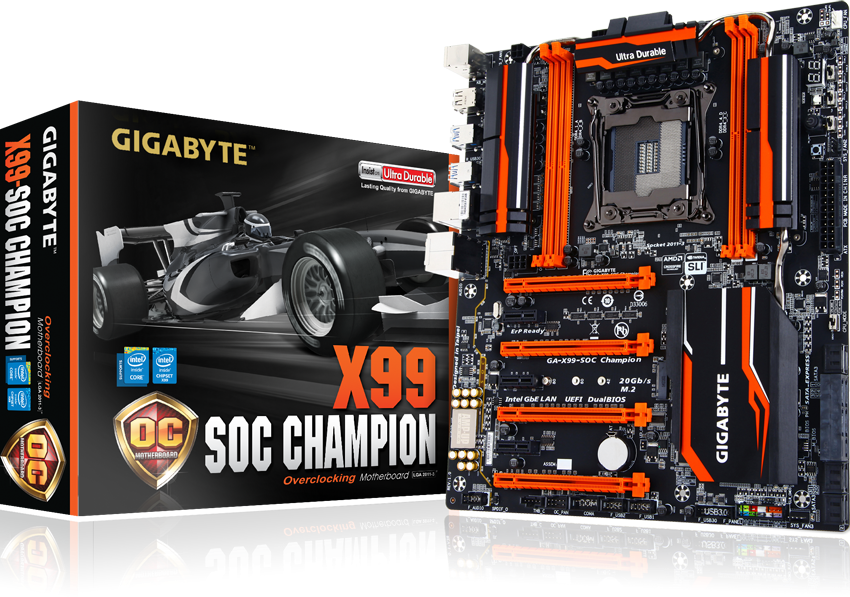

Specifications
- CPU
- Support for Intel® Core™ i7 processors in the LGA2011-3 package
- Support for Intel® Xeon® E5-1600 / E5-2600 / E5-4600 v3 / v4 processors in the LGA2011-3 package
- L3 cache varies with CPU
- Chipset
- Intel® X99 Express Chipset
- Memory
- 4 x DDR4 DIMM sockets supporting up to 64 GB of system memory
* Support for up to 256 GB of system memory when using Registered DIMMs.
* Due to a Windows 32-bit operating system limitation, when more than 4 GB of physical memory is installed, the actual memory size displayed will be less than the size of the physical memory installed. - 4 channel memory architecture
- Support for DDR4 3400(O.C.)* / 3333(O.C.) / 3200(O.C.) / 3000(O.C.) / 2800(O.C.) / 2666(O.C.) / 2400(O.C.) / 2133 MHz memory modules
- Support for non-ECC memory modules
- Support for Extreme Memory Profile (XMP) memory modules
- Support for RDIMM 1Rx8/2Rx8 memory modules (operates in non-ECC mode)
** Please refer "Memory Support List" for more information.- 4 x DDR4 DIMM sockets supporting up to 64 GB of system memory
- Audio
- Realtek® ALC1150 codec
- High Definition Audio
- 2/4/5.1/7.1-channel
- Support for S/PDIF Out
- LAN
- Intel® GbE LAN chip (10/100/1000 Mbit)
- Expansion Slots
- 2 x PCI Express x16 slots, running at x16 (PCIE_1,PCIE_2)
* For optimum performance, if only one PCI Express graphics card is to be installed, be sure to install it in the PCIE_1 slot; if you are installing two PCI Express graphics cards, it is recommended that you install them in the PCIE_1 and PCIE_2 slots. - 2 x PCI Express x16 slots, running at x8 (PCIE_3,PCIE_4)
* The PCIE_4 slot shares bandwidth with the PCIE_1 slot. When the PCIE_4 slot is populated, the PCIE_1 slot will operate at up to x8 mode.
* When an 28 lane CPU is installed, the PCIE_2 slot operates at up to x8 mode and the PCIE_3 operates at up to x4 mode.
(All PCI Express x16 slots conform to PCI Express 3.0 standard.) - 3 x PCI Express x1 slots
(All PCI Express x1 slots conform to PCI Express 2.0 standard.)
- 2 x PCI Express x16 slots, running at x16 (PCIE_1,PCIE_2)
- Multi-Graphics Technology
- Support for NVIDIA® Quad-GPU SLI™ and 4-Way/3-Way/2-Way NVIDIA® SLI™ technologies
- Support for AMD Quad-GPU CrossFireX™ and 4-Way/3-Way/2-Way AMD CrossFire™ technologies
- Storage Interface
- Chipset:
- 1 x M.2 PCIe connector
(Socket 3, M key, type 2242/2260/2280 PCIe x4x2/x1 SSD support)
* Support for M.2 PCIe SSDs only. - 1 x SATA Express connector
- 6 x SATA 6Gb/s connectors (SATA3 0~5)
- Support for RAID 0, RAID 1, RAID 5, and RAID 10
* Only AHCI mode is supported when an M.2 PCIe SSD or a SATA Express device is installed.
(M2_20G and SATA Express connectors can only be used one at a time. The SATA Express connector becomes unavailable when an M.2 SSD is installed, but the SATA3 4/5 connectors are still functional.)
- 4 x SATA 6Gb/s connectors (sSATA3 0~3), supporting IDE and AHCI modes only
(An operating system installed on the SATA3 0~5 ports cannot be used on the sSATA 0~3 ports.)
- 1 x M.2 PCIe connector
- USB
- Chipset:
- 2 x USB 3.0/2.0 ports available through the internal USB header
- 8 x USB 2.0/1.1 ports (4 ports on the back panel, 4 ports available through the internal USB headers)
- 4 x USB 3.0/2.0 ports on the back panel
- Internal I/O Connectors
- 1 x 24-pin ATX main power connector
- 1 x 8-pin ATX 12V power connector
- 1 x 4-pin ATX 12V power connector
- 1 x OC PEG Power Connector
- 1 x SATA Express connector
- 10 x SATA 6Gb/s connectors
- 1 x M.2 Socket 3 connector
- 1 x CPU fan header
- 1 x water cooling fan header (CPU_OPT)
- 3 x system fan headers
- 1 x Thunderbolt™ add-in card connector
- 1 x OC Panel connector (for future expansion)
- 1 x front panel header
- 1 x front panel audio header
- 1 x S/PDIF Out header
- 1 x USB 3.0/2.0 header
- 2 x USB 2.0/1.1 headers
- 1 x serial port header
- 1 x Clear CMOS jumper
- 1 x power button
- 1 x reset button
- 1 x Clear CMOS button
- 1 x CPU mode switch
- 1 x OC Trigger switch
- 1 x DualBIOS switch
- 1 x BIOS switch
- Voltage Measurement Points
- Back Panel Connectors
- 1 x PS/2 keyboard port
- 1 x PS/2 mouse port
- 4 x USB 2.0/1.1 ports
- 4 x USB 3.0/2.0 ports
- 1 x RJ-45 port
- 1 x optical S/PDIF Out connector
- 5 x audio jacks (Center/Subwoofer Speaker Out, Rear Speaker Out, Line In, Line Out, Mic In)
- I/O Controller
- iTE I/O Controller Chip
- H/W Monitoring
- System voltage detection
- CPU/System/Chipset temperature detection
- CPU/CPU OPT/System fan speed detection
- CPU/System/Chipset overheating warning
- CPU/CPU OPT/System fan fail warning
- CPU/CPU OPT/System fan speed control
* Whether the fan speed control function is supported will depend on the cooler you install.
- BIOS
- 2 x 128 Mbit flash
- Use of licensed AMI UEFI BIOS
- Support for DualBIOS™
- PnP 1.0a, DMI 2.7, WfM 2.0, SM BIOS 2.7, ACPI 5.0
- Unique Features
- Support for APP Center
* Available applications in APP Center may differ by motherboard model. Supported functions of each application may also differ depending on motherboard specifications.
@BIOS
Ambient LED
EasyTune
EZ Setup
Fast Boot
Cloud Station
ON/OFF Charge
Smart TimeLock
Smart Recovery 2
System Information Viewer
USB Blocker
V-Tuner - Support for Q-Flash
- Support for Smart Switch
- Support for Xpress Install
- Support for APP Center
- Bundled Software
- Norton® Internet Security (OEM version)
- Intel® Smart Response Technology
- cFosSpeed
- Operating System
- Support for Windows 10/8.1/8/7
- Form Factor
- E-ATX Form Factor; 30.5cm x 26.4cm
- Remark
- Due to different Linux support condition provided by chipset vendors, please download Linux driver from chipset vendors' website or 3rd party website.
- Most hardware/software vendors may no longer offer drivers to support Win9X/ME/2000/XP. If drivers are available from the vendors, we will update them on the GIGABYTE website.
- CPU
- Support for Intel® Core™ i7 processors in the LGA2011-3 package
- Support for Intel® Xeon® E5-1600 / E5-2600 / E5-4600 v3 / v4 processors in the LGA2011-3 package
- L3 cache varies with CPU
- Chipset
- Intel® X99 Express Chipset
- Memory
- 4 x DDR4 DIMM sockets supporting up to 64 GB of system memory
* Support for up to 256 GB of system memory when using Registered DIMMs.
* Due to a Windows 32-bit operating system limitation, when more than 4 GB of physical memory is installed, the actual memory size displayed will be less than the size of the physical memory installed. - 4 channel memory architecture
- Support for DDR4 3400(O.C.)* / 3333(O.C.) / 3200(O.C.) / 3000(O.C.) / 2800(O.C.) / 2666(O.C.) / 2400(O.C.) / 2133 MHz memory modules
- Support for non-ECC memory modules
- Support for Extreme Memory Profile (XMP) memory modules
- Support for RDIMM 1Rx8/2Rx8 memory modules (operates in non-ECC mode)
** Please refer "Memory Support List" for more information.- 4 x DDR4 DIMM sockets supporting up to 64 GB of system memory
- Audio
- Realtek® ALC1150 codec
- High Definition Audio
- 2/4/5.1/7.1-channel
- Support for S/PDIF Out
- LAN
- Intel® GbE LAN chip (10/100/1000 Mbit)
- Expansion Slots
- 2 x PCI Express x16 slots, running at x16 (PCIE_1,PCIE_2)
* For optimum performance, if only one PCI Express graphics card is to be installed, be sure to install it in the PCIE_1 slot; if you are installing two PCI Express graphics cards, it is recommended that you install them in the PCIE_1 and PCIE_2 slots. - 2 x PCI Express x16 slots, running at x8 (PCIE_3,PCIE_4)
* The PCIE_4 slot shares bandwidth with the PCIE_1 slot. When the PCIE_4 slot is populated, the PCIE_1 slot will operate at up to x8 mode.
* When an 28 lane CPU is installed, the PCIE_2 slot operates at up to x8 mode and the PCIE_3 operates at up to x4 mode.
(All PCI Express x16 slots conform to PCI Express 3.0 standard.) - 3 x PCI Express x1 slots
(All PCI Express x1 slots conform to PCI Express 2.0 standard.)
- 2 x PCI Express x16 slots, running at x16 (PCIE_1,PCIE_2)
- Multi-Graphics Technology
- Support for NVIDIA® Quad-GPU SLI™ and 4-Way/3-Way/2-Way NVIDIA® SLI™ technologies
- Support for AMD Quad-GPU CrossFireX™ and 4-Way/3-Way/2-Way AMD CrossFire™ technologies
- Storage Interface
- Chipset:
- 1 x M.2 PCIe connector
(Socket 3, M key, type 2242/2260/2280 PCIe x4x2/x1 SSD support)
* Support for M.2 PCIe SSDs only. - 1 x SATA Express connector
- 6 x SATA 6Gb/s connectors (SATA3 0~5)
- Support for RAID 0, RAID 1, RAID 5, and RAID 10
* Only AHCI mode is supported when an M.2 PCIe SSD or a SATA Express device is installed.
(M2_20G and SATA Express connectors can only be used one at a time. The SATA Express connector becomes unavailable when an M.2 SSD is installed, but the SATA3 4/5 connectors are still functional.)
- 4 x SATA 6Gb/s connectors (sSATA3 0~3), supporting IDE and AHCI modes only
(An operating system installed on the SATA3 0~5 ports cannot be used on the sSATA 0~3 ports.)
- 1 x M.2 PCIe connector
- USB
- Chipset:
- 2 x USB 3.0/2.0 ports available through the internal USB header
- 8 x USB 2.0/1.1 ports (4 ports on the back panel, 4 ports available through the internal USB headers)
- 4 x USB 3.0/2.0 ports on the back panel
- Internal I/O Connectors
- 1 x 24-pin ATX main power connector
- 1 x 8-pin ATX 12V power connector
- 1 x 4-pin ATX 12V power connector
- 1 x OC PEG Power Connector
- 1 x SATA Express connector
- 10 x SATA 6Gb/s connectors
- 1 x M.2 Socket 3 connector
- 1 x CPU fan header
- 1 x water cooling fan header (CPU_OPT)
- 3 x system fan headers
- 1 x Thunderbolt™ add-in card connector
- 1 x OC Panel connector (for future expansion)
- 1 x front panel header
- 1 x front panel audio header
- 1 x S/PDIF Out header
- 1 x USB 3.0/2.0 header
- 2 x USB 2.0/1.1 headers
- 1 x serial port header
- 1 x Clear CMOS jumper
- 1 x power button
- 1 x reset button
- 1 x Clear CMOS button
- 1 x CPU mode switch
- 1 x OC Trigger switch
- 1 x DualBIOS switch
- 1 x BIOS switch
- Voltage Measurement Points
- Back Panel Connectors
- 1 x PS/2 keyboard port
- 1 x PS/2 mouse port
- 4 x USB 2.0/1.1 ports
- 4 x USB 3.0/2.0 ports
- 1 x RJ-45 port
- 1 x optical S/PDIF Out connector
- 5 x audio jacks (Center/Subwoofer Speaker Out, Rear Speaker Out, Line In, Line Out, Mic In)
- I/O Controller
- iTE I/O Controller Chip
- H/W Monitoring
- System voltage detection
- CPU/System/Chipset temperature detection
- CPU/CPU OPT/System fan speed detection
- CPU/System/Chipset overheating warning
- CPU/CPU OPT/System fan fail warning
- CPU/CPU OPT/System fan speed control
* Whether the fan speed control function is supported will depend on the cooler you install.
- BIOS
- 2 x 128 Mbit flash
- Use of licensed AMI UEFI BIOS
- Support for DualBIOS™
- PnP 1.0a, DMI 2.7, WfM 2.0, SM BIOS 2.7, ACPI 5.0
- Unique Features
- Support for APP Center
* Available applications in APP Center may differ by motherboard model. Supported functions of each application may also differ depending on motherboard specifications.
@BIOS
Ambient LED
EasyTune
EZ Setup
Fast Boot
Cloud Station
ON/OFF Charge
Smart TimeLock
Smart Recovery 2
System Information Viewer
USB Blocker
V-Tuner - Support for Q-Flash
- Support for Smart Switch
- Support for Xpress Install
- Support for APP Center
- Bundled Software
- Norton® Internet Security (OEM version)
- Intel® Smart Response Technology
- cFosSpeed
- Operating System
- Support for Windows 10/8.1/8/7
- Form Factor
- E-ATX Form Factor; 30.5cm x 26.4cm
- Remark
- Due to different Linux support condition provided by chipset vendors, please download Linux driver from chipset vendors' website or 3rd party website.
- Most hardware/software vendors may no longer offer drivers to support Win9X/ME/2000/XP. If drivers are available from the vendors, we will update them on the GIGABYTE website.

* The terms HDMI, HDMI High-Definition Multimedia Interface, HDMI Trade dress and the HDMI Logos are trademarks or registered trademarks of HDMI Licensing Administrator, Inc.
* The entire materials provided herein are for reference only. GIGABYTE reserves the right to modify or revise the content at anytime without prior notice.
* Advertised performance is based on maximum theoretical interface values from respective Chipset vendors or organization who defined the interface specification. Actual performance may vary by system configuration.
* All trademarks and logos are the properties of their respective holders.
* Due to standard PC architecture, a certain amount of memory is reserved for system usage and therefore the actual memory size is less than the stated amount.
* Advertised performance is based on maximum theoretical interface values from respective Chipset vendors or organization who defined the interface specification. Actual performance may vary by system configuration.
* All trademarks and logos are the properties of their respective holders.
* Due to standard PC architecture, a certain amount of memory is reserved for system usage and therefore the actual memory size is less than the stated amount.